





Product docs and API reference are now on Akamai TechDocs.
Search product docs.
Search for “” in product docs.
Search API reference.
Search for “” in API reference.
Search Results
results matching
results
No Results
Filters
Overview of DNS and DNS Records
The Domain Name System (DNS) is the Internet’s address book. DNS directs web traffic to your Linode and email to your inbox by mapping memorable domain names like example.com to IP addresses like 192.0.2.8 or 0123:4567:89ab:cdef:0123:4567:89ab:cdef. This guide introduces basic DNS concepts and the different types of DNS records.
How DNS Works
Before adding any DNS records, you should learn the basics of DNS.
Domain Names
Domain names are best understood by reading from right to left. The broadest domain classification is on the right, and becomes more specific as you move to the left. In the examples below, the top-level domain, or TLD, is .com.
example.com
mail.hello.example.com
Every term to the left of the TLD is separated by a period and considered a more specific subdomain, although first-level subdomains plus their TLDs (example.com) are conventionally referred to as domains. Moving to the left, hello and mail are the second- and third-level subdomains, respectively. Subdomains are typically used to uniquely identify specific machines or services, but this is left up to the domain owner.
Name Servers
Choosing and specifying name servers is an essential part of domain ownership. If you don’t, connecting client devices won’t know where to find your DNS information so your domain won’t resolve. Name servers host a domain’s DNS information in a text file called a zone file. They’re are also known as Start of Authority (SOA) records. You can host your DNS information on name servers in one of several locations:
- Linode (recommended)
- Your domain registrar
- Your own DNS server
- Third-party DNS hosting
Using Linode’s free name servers is the easiest approach, because Linode provides a default zone file with all the right IP addresses for your website and email. Linode’s name servers will work well for both basic and advanced setups. However, you can also look into the options offered by your registrar and third-party DNS hosts, or host your own DNS if you want control over as much of the DNS process as possible.
You’ll need to specify name servers on your domain registrar’s website. They’ll take care of publishing that information to the higher-level name servers and you should specify at least two name servers. That way, if one of them is down, the next one can continue to serve your DNS information.
DNS Records and Zone Files
The next aspect of DNS management is specifying DNS records, which match domain names to IP addresses. The DNS records are then automatically bundled up into a zone file, which is what allows connecting devices to look up the correct IP address for your domain. If you decide to use Linode’s name servers, our DNS Manager will help you create a default zone file. It contains records similar to the following:
example.com.), which will make the name fully-qualified.; example.com [448369]
$TTL 86400
@ IN SOA ns1.linode.com. admin.example.com. 2013062147 14400 14400 1209600 86400
@ NS ns1.linode.com.
@ NS ns2.linode.com.
@ NS ns3.linode.com.
@ NS ns4.linode.com.
@ NS ns5.linode.com.
@ MX 10 mail.example.com.
@ A 12.34.56.78
mail A 12.34.56.78
www A 12.34.56.78
Every domain’s zone file contains the domain administrator’s email address, the name servers, and the DNS records. Of course, you are not limited to these default entries. You can create a variety of DNS records for as many different subdomains as you wish. To learn how to add individual DNS records using the DNS Manager, read the Linode DNS Manager Overview article guide.
DNS Resolution
So how does DNS actually work? First, the domain name needs to get translated into your Linode’s IP address. DNS matches human-friendly domain names like example.com to computer-friendly IP addresses like 192.0.2.8. This happens in a special text file called a zone file, which lists domains and their corresponding IP addresses (and a few other things). A zone file is like a phone book that matches names with street addresses.
Here’s how the DNS lookup process works:
You type a domain name like example.com into your browser’s address bar.
Your computer is connected to the internet through an internet service provider (ISP). Your ISP’s DNS resolver queries a root nameserver for the proper TLD nameserver. In other words, it asks the root nameserver, Where can I find the nameserver for .com domains?
The root nameserver responds with the IP address for the .com nameserver.
The ISP’s DNS resolver uses the IP address it got from the root nameserver to ask the .com nameserver, *Where can I find the nameserver for example.com?
The .com nameserver responds with the IP address for the example.com nameserver.
The ISP’s DNS resolver reads the zone file from your domain’s nameserver.
The zone file shows which IP address goes with the domain.
Now that the ISP has the IP address for example.com, it (in short) returns this to your browser which then accesses the site’s web server.
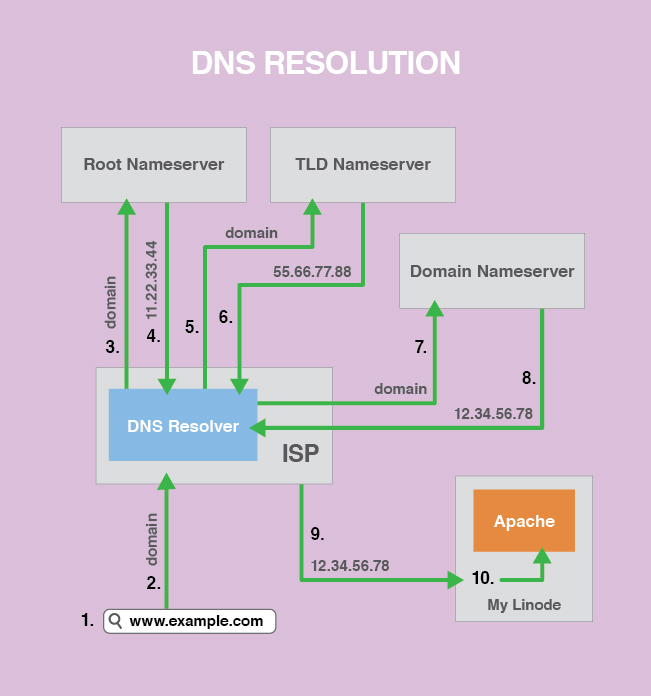
The scenario described above is what happens if the ISP has no current information about the requested domain. In actuality, ISPs cache a lot of DNS information after they’ve looked it up the first time. This results in faster lookups and less strain on DNS servers.
Usually caching is a good thing, but it can be a problem if you’ve recently made a change to your DNS information, like when you move to Linode from a different hosting provider. In such a case, you’ll want to pay attention to your zone file’s time to live (TTL) so that your DNS change happens as quickly as possible.
Types of DNS Records
A and AAAA
An A record points your domain or subdomain to your Linode’s IP address, which allows web traffic to reach your Linode. This is the core function of DNS. A typical A record looks like either of the following:
example.com     A       12.34.56.78

hello.example.com       A       12.34.56.78
You can point different subdomains to different IP addresses. If you want to point every subdomain of example.com to your Linode’s IP, you can use an asterisk (*) as your subdomain:
*.example.com A 12.34.56.78
An AAAA record is just like an A record, but for IPv6 IP addresses. A typical AAAA record looks like the following:
example.com AAAA 0123:4567:89ab:cdef:0123:4567:89ab:cdef
AXFR
An AXFR record is a type of DNS record used for DNS replication, although there are more modern ways to do DNS replication. AXFR records are not used in ordinary zone files. Rather, they are used on a slave DNS server to replicate the zone file from a master DNS server.
For an example of how to configure Linode’s nameservers as slave DNS servers using AXFR, see our guide on configuring DNS in cPanel.
CAA
DNS Certification Authority Authorization uses DNS to allow the holder of a domain to specify which certificate authorities are allowed to issue certificates for that domain. See our Add CAA Records in the Linode Cloud Manager guide for a configuration walkthrough.
CNAME
A CNAME record or Canonical Name record matches a domain or subdomain to a different domain. With a CNAME record, DNS lookups use the target domain’s DNS resolution as the alias’s resolution. Here’s an example:
alias.com       CNAME   example.com.
example.com     A       12.34.56.78
With this setup, when alias.com is requested, the initial DNS lookup will find the CNAME entry with the target of example.com. A new DNS lookup will be started for example.com, which will find the IP address 12.34.56.78. Finally, visitors to alias.com will be directed to 12.34.56.78.
CNAME records exist so that domains can have aliases. Some mail servers handle mail oddly for domains with CNAME records, so you should not use a CNAME record for a domain that gets email. Likewise, MX records cannot reference CNAME-defined hostnames. The target domain for a CNAME record should also have a normal A-record resolution. Chaining or looping CNAME records is not recommended.
DKIM
A DKIM record or DomainKeys Identified Mail record displays the public key for authenticating messages that have been signed with the DKIM protocol. This practice increases the capability to check mail authenticity. A typical DKIM record looks like the following:
selector1._domainkey.example.com TXT k=rsa;p=J8eTBu224i086iK
DKIM records are implemented as text records. The record must be created for a subdomain, which has a unique selector for that key, then a period (.), and then _domainkey.example.com. The type is TXT, and the value includes the type of key, followed by the actual key.
MX
An MX record or mail exchanger record sets the mail delivery destination for a domain or subdomain. A typical MX record looks like the following:
example.com         MX      10  mail.example.com.
mail.example.com    A           12.34.56.78
The above records direct mail for example.com to the mail.example.com server. The target domain (mail.example.com above) needs to have its own A record that resolves to your Linode. An MX record should ideally point to a domain that is also the hostname for its server.
Your MX records don’t necessarily have to point to your Linode. If you’re using a third-party mail service like Google Workspace, you should use the MX records they provide.
Priority is another component of MX records. This is the number written between the record type and the target server (10 in the example above). Priority allows you to designate a fallback server (or servers) for mail for a particular domain. Lower numbers have a higher priority. Here’s an example of a domain that has two fallback mail servers:
example.com         MX      10  mail_1.example.com
example.com         MX      20  mail_2.example.com
example.com         MX      30  mail_3.example.com
In this example, if mail_1.example.com is down, mail will be delivered to mail_2.example.com. If mail_2.example.com is also down, mail will be delivered to mail_3.example.com.
If you do not intend to accept any email through your domain, you can add a Null MX record, which is simply a specially formatted MX record. This is preferable to not adding any MX records, which causes the sender to still perform email delivery attempts on any A or AAAA records for that domain. A Null MX record tells the sending mail server to stop all delivery attempts, freeing up resources and allowing the sender to resolve any issues with the email address faster.
The instructions for creating a Null MX record vary by DNS provider. For Linode’s DNS Manager, the Subdomain (name) field should be blank, the Preference (priority) field should be 0, and the Mail Server field should be blank. This prevents you from creating any other MX records for the domain.
NS
NS records or name server records set the nameservers for a domain or subdomain. The primary nameserver records for your domain are set both at your registrar and in your zone file. Typical nameserver records (you need at least two) look like this:
example.com     NS      ns1.linode.com.
example.com     NS      ns2.linode.com.
example.com     NS      ns3.linode.com.
example.com     NS      ns4.linode.com.
example.com     NS      ns5.linode.com.
The nameservers you designate at your registrar then carry the zone file for your domain.
You can also set up different nameservers for any of your subdomains. Subdomain NS records get configured in your primary domain’s zone file. For example, if you’re using Linode’s nameservers, you could configure separate NS records in your Linode zone file for the subdomain mail.example.com as shown below:
mail.example.com    NS      ns1.nameserver.com
mail.example.com    NS      ns2.nameserver.com
Primary nameservers get configured at your registrar and secondary subdomain nameservers get configured in the primary domain’s zone file. The order of NS records does not matter. DNS requests are sent randomly to the different servers, and if one host fails to respond, another one will be queried.
PTR
A PTR record or pointer record matches up an IP address to a domain or subdomain, allowing reverse DNS queries to function. It performs the opposite service an A record does, in that it allows you to look up the domain associated with a particular IP address, instead of vice versa.
PTR records are usually set with your hosting provider. They are not part of your domain’s zone file. This means that you’ll always set reverse DNS for your Linodes in the Linode Manager, even if your nameservers are elsewhere. Likewise, if you have servers somewhere else but are using Linode’s nameservers, you will still have to set up your PTR records with your hosting provider.
As a prerequisite for adding a PTR record, you need to create a valid, live A or AAAA record that points the desired domain to that IP. If you want an IPv4 PTR record, point the domain or subdomain to your Linode’s IPv4 address. If you want an IPv6 PTR record, point the domain to your Linode’s IPv6 address. Beyond that, IPv4 and IPv6 PTR records work the same way.
For instructions on setting up reverse DNS on your Linode, see our Reverse DNS guide.
SOA
An SOA record or Start of Authority record labels a zone file with the name of the host where it was originally created. Next, it lists the contact email address for the person responsible for the domain. There are also various numbers, which we’ll get into in detail in a moment. First, here’s a typical SOA record:
@ IN SOA ns1.linode.com. admin.example.com. 2013062147 14400 14400 1209600 86400
Here’s what the numbers mean:
- Serial number: The revision number for this domain’s zone file. It changes when the file gets updated.
- Refresh time: The amount of time (in seconds) a secondary DNS server will keep the zone file before it checks for changes.
- Retry time: The amount of time a secondary DNS server will wait before retrying a failed zone file transfer.
- Expire time: The amount of time a secondary DNS server will wait before expiring its current zone file copy if it cannot update itself.
- Minimum TTL: The minimum amount of time other servers should keep data cached from this zone file.
The single nameserver mentioned in the SOA record is considered the primary master for the purposes of Dynamic DNS and is the server where zone file changes get made before they are propagated to all other nameservers.
SPF
An SPF record or Sender Policy Framework record lists the designated mail servers for a domain or subdomain. It helps establish the legitimacy of your mail server and reduces the chances of spoofing, which occurs when someone fakes the headers on an email to make it look like it’s coming from your domain, even though it did not. Spammers sometimes try to do this to get around filters.
An SPF record for your domain tells other receiving mail servers which outgoing server(s) are valid sources of email so they can reject spoofed mail from your domain that has originated from unauthorized servers. A very basic SPF record looks like the following:
example.com TXT "v=spf1 a ~all"
" should not be applied in the example above.In your SPF record, you should list all the mail servers from which you send mail, and then exclude all the others. Your SPF record will have a domain or subdomain, type (which is TXT, or SPF if your name server supports it), and text (which starts with “v=spf1” and contains the SPF record settings).
If your Linode is the only mail server you use, you should be able to use the example record above. With this SPF record, the receiving server will check the IP addresses of both the sending server and the IP address of example.com. If the IPs match, the check passes. If not, the check will soft fail (i.e., the message will be marked but will not automatically be rejected for failing the SPF check).
SRV
An SRV record or service record matches up a specific service that runs on your domain or subdomain to a target domain. This allows you to direct traffic for specific services, like instant messaging, to another server. A typical SRV record looks like the following:
_service._protocol.example.com SRV 10 0 5060 service.example.com
Here’s a breakdown of the elements in an SRV record:
- Service: The name of the service must be preceded by an underscore (_) and followed by a period (.). The service could be something like _xmpp.
- Protocol: The name of the protocol must be proceeded by an underscore (_) and followed by a period (.). The protocol could be something like _tcp.
- Domain: The name of the domain that will receive the original traffic for this service.
- Priority: The first number (10 in the example above) allows you to set the priority for the target server. You can set different targets with different priorities, which allows you to have a fallback server (or servers) for that service. Lower numbers have a higher priority.
- Weight: If two records have the same priority, weight is used instead.
- Port: The TCP or UDP port on which the service runs.
- Target: The target domain or subdomain. This domain must have an A or AAAA record that resolves to an IP address.
An example use of SRV records would be to set up Federated VoIP.
TXT
A TXT record or text record provides information about the domain in question to other resources on the internet. It’s a flexible type of DNS record that can serve many different purposes depending on the specific contents. One common use of the TXT record is to create an SPF record on nameservers that don’t natively support SPF. Another use is to create a DKIM record for mail signing.
" are applied. When applying TXT records using the Linode DNS Manager, quotation marks " should not be applied in most scenarios, as they are added automatically in cases where they are needed.This page was originally published on